Understanding REST APIs in Node.js
Why Do We Need APIs?
Imagine you open a food delivery app.
When you search for restaurants:
the app requests data from a server
the server sends restaurant data back
When you place an order:
the app sends order details
the server saves it
This communication between:
frontend (client)
backend (server)
happens using APIs.
What is a REST API?
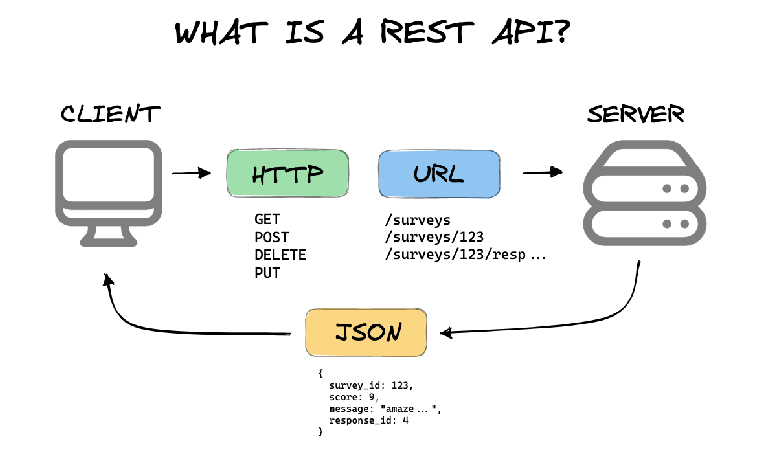
REST API is a way for:
clients
servers
to communicate using HTTP.
Simple meaning:
A REST API lets applications send and receive data in a structured way.
Think of It Like a Waiter
Real-Life Analogy
You → Client
Kitchen → Server
Waiter → API
Flow:
Client → API → Server
Server → API → Client
The API carries requests and responses between both sides.
REST Request-Response Flow
Example:
Client sends request
Server processes it
Server sends response
What Does REST Mean?
REST stands for:
Representational State Transfer
Sounds complicated, but don’t worry.
For beginners, REST mainly means:
clean URLs
proper HTTP methods
organized API structure
What Are Resources in REST?
In REST APIs, everything is treated as a resource.
Examples:
users
products
orders
posts
If your app manages users:
/users
Here:
usersis the resource
Understanding Resources
Think of resources as collections of data.
Example:
/users
/products
/orders
Each resource gets its own routes.
HTTP Methods in REST APIs
HTTP methods describe:
what action we want to perform.
Main methods:
GET
POST
PUT
DELETE
CRUD Operations
CRUD means:
Create
Read
Update
Delete
REST APIs map CRUD operations to HTTP methods.
CRUD vs HTTP Methods
| Operation | HTTP Method |
|---|---|
| Read | GET |
| Create | POST |
| Update | PUT |
| Delete | DELETE |
GET Method
Used to fetch data.
Example:
GET /users
Meaning:
Give me all users.
Express example:
app.get('/users', (req, res) => {
  res.send('All users');
});
GET Single User
GET /users/5
Meaning:
Give me user with ID 5.
POST Method
Used to create data.
Example:
POST /users
Meaning:
Create a new user.
Express example:
app.post('/users', (req, res) => {
  res.send('User created');
});
PUT Method
Used to update existing data.
Example:
PUT /users/5
Meaning:
Update user with ID 5.
Express example:
app.put('/users/:id', (req, res) => {
  res.send('User updated');
});
DELETE Method
Used to remove data.
Example:
DELETE /users/5
Meaning:
Delete user with ID 5.
Express example:
app.delete('/users/:id', (req, res) => {
  res.send('User deleted');
});
REST Route Design
Good REST APIs use clean route names.
Good Routes
/users
/users/10
/products
/orders
Simple and readable.
Bad Routes
/getUsers
/createUser
/deleteUser
Why bad? Because HTTP methods already describe actions.
REST Style Thinking
Instead of:
GET /getUsers
REST prefers:
GET /users
Cleaner and easier to understand.
Status Codes Basics
When server responds, it also sends a status code.
Status codes tell:
whether request succeeded or failed.
Common Status Codes
| Code | Meaning |
|---|---|
| 200 | Success |
| 201 | Created |
| 404 | Not Found |
| 500 | Server Error |
Example Response
res.status(200).send('Users fetched');
Creating user:
res.status(201).send('User created');
Full REST Example with Users
const express = require('express');

const app = express();

app.get('/users', (req, res) => {
  res.send('Get all users');
});

app.get('/users/:id', (req, res) => {
  res.send(`Get user ${req.params.id}`);
});

app.post('/users', (req, res) => {
  res.send('Create user');
});

app.put('/users/:id', (req, res) => {
  res.send(`Update user ${req.params.id}`);
});

app.delete('/users/:id', (req, res) => {
  res.send(`Delete user ${req.params.id}`);
});

app.listen(3000);
Understanding the Flow
Example:
GET /users/10
Flow:
Client sends request
Server receives route
Server processes data
Response sent back
Before vs After REST Design
Non-REST Style
/getAllUsers
/addNewUser
/removeUser
REST Style
GET /users
POST /users
DELETE /users/5
Much cleaner.
Why REST APIs Are Popular
REST APIs are:
simple
readable
organized
scalable
Almost every modern backend application uses REST concepts.
Practice Assignment
1. Create GET Route
Create:
GET /users
Return:
All users
2. Create POST Route
Create:
POST /users
Return:
User created
3. Create PUT Route
Create:
PUT /users/:id
Print user ID.
4. Create DELETE Route
Create:
DELETE /users/:id
Return delete message.
5. Use Status Codes
Try:
200201404
and observe responses.

