Understanding the Event Loop in Node.js (Beginner-Friendly Guide)
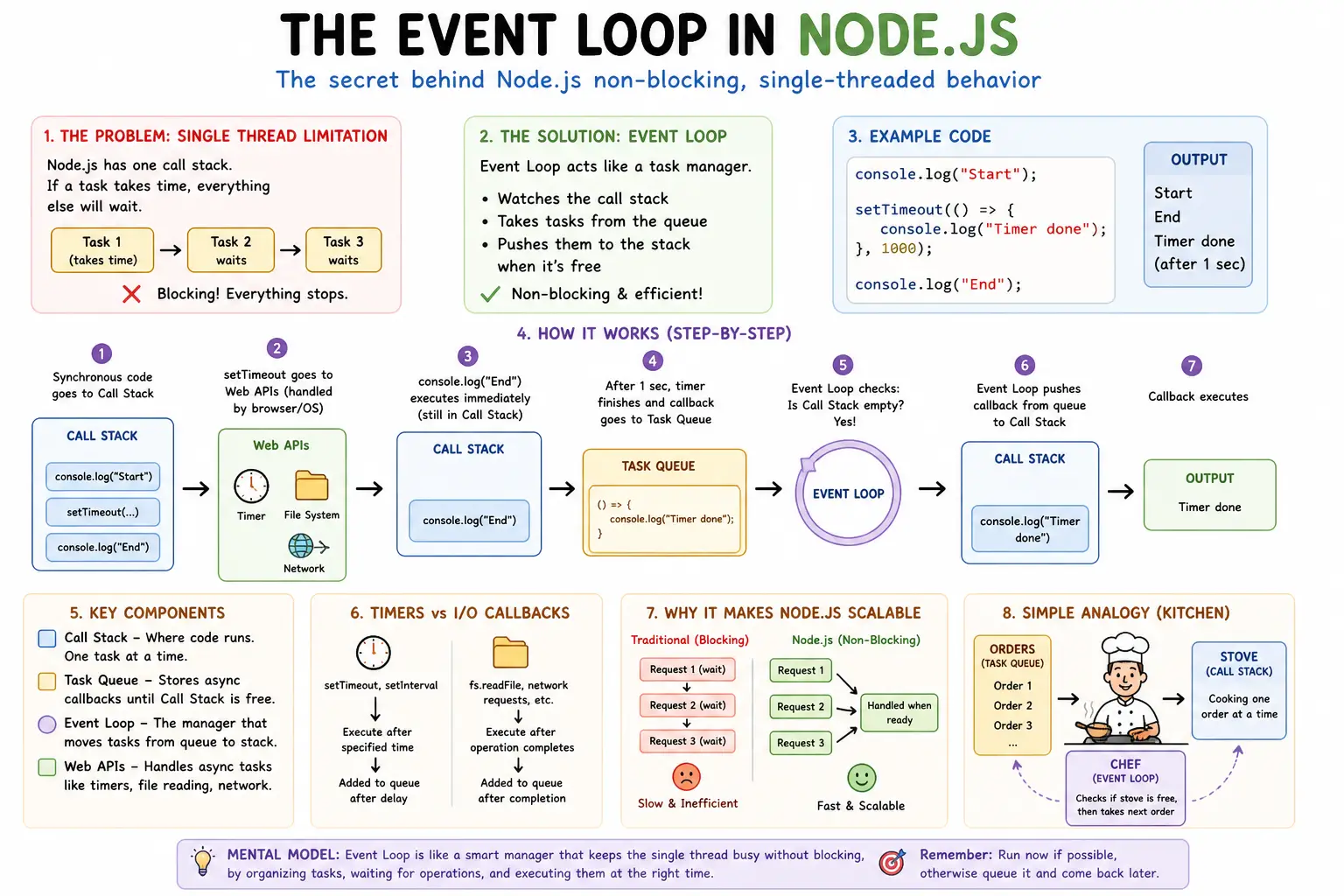
1. A Simple Real-World Problem
Node.js runs on a single thread.
Now imagine this code:
const data = readFile("big-file.txt"); // takes time
console.log("Done");
If Node.js waited for the file to finish reading, everything else would stop.
Question:
How does Node.js handle multiple tasks without blocking, even with just one thread?
2. The Limitation: Single Thread
Node.js has:
One main thread
One call stack
That means:
👉 It can do one thing at a time
So if one task blocks the thread, everything else stops.
3. Why Node.js Needs an Event Loop
To avoid blocking, Node.js uses an event loop.
Think of it like a task manager:
Keeps track of tasks
Decides what to run next
Ensures smooth execution
Without it, Node.js would freeze during slow operations.
4. What is the Event Loop?
The event loop is a system that:
Watches the call stack
Takes tasks from a queue
Pushes them to the stack when ready
5. Key Components (Conceptual)
Call Stack
Where code executes
Runs one function at a time
Task Queue
Stores async callbacks
Waits until stack is empty
Event Loop
Checks: “Is the stack empty?”
If yes → pushes next task from queue
6. Simple Flow
console.log("Start");

setTimeout(() => {
  console.log("Timer done");
}, 1000);

console.log("End");
Output:
Start
End
Timer done
7. Step-by-Step Execution
console.log("Start")→ runs immediatelysetTimeout→ registers timer (goes outside JS thread)console.log("End")→ runs immediatelyAfter 1 second → callback added to queue
Event loop checks stack
Stack empty → moves callback to stack
Executes
"Timer done"
8. Task Queue vs Call Stack (Simple Analogy)
Think of:
Call Stack → kitchen stove (only one dish at a time)
Task Queue → waiting orders
Event Loop → chef checking if stove is free
Flow:
Order arrives → goes to queue
Chef waits → stove free?
Yes → cooks next order
9. How Async Operations Are Handled
Node.js does not handle everything itself.
It delegates tasks like:
File reading
Network requests
Timers
These are handled by:
System APIs
Thread pool
Once done:
👉 Their callbacks go to the task queue
10. Timers vs I/O Callbacks (High Level)
Timers
setTimeout(() => {
  console.log("Timer");
}, 1000);
Runs after a delay
Added to queue after time completes
I/O Callbacks
fs.readFile("file.txt", () => {
  console.log("File read");
});
Runs after file operation completes
Depends on system speed
Key Difference
Timers → time-based
I/O → completion-based
11. Why This Makes Node.js Scalable
Instead of:
- Waiting for tasks to finish
Node.js:
Offloads work
Keeps handling new requests
Processes results later
This allows:
High concurrency
Efficient resource usage
12. Before vs After Thinking
Blocking Approach (Bad)
Task1 → wait → Task2 → wait → Task3
Everything is sequential.
Event Loop Approach (Good)
Start Task1 → move on
Start Task2 → move on
Handle results when ready
13. Mental Model
Call stack = where code runs
Task queue = where async callbacks wait
Event loop = manager moving tasks to execution
Think:
“Run now if possible, otherwise queue it and come back later”
14. Practice Assignment
1.
Predict output:
console.log("A");

setTimeout(() => {
  console.log("B");
}, 0);

console.log("C");
2.
Write:
One timer example
One file read example
Observe execution order.
3.
Explain in your own words:
- Why Node.js does not block
15. Suggested Diagram Ideas
Call Stack + Queue Flow
Call Stack        Task Queue
-----------       -----------
| console.log |   | callback |
-----------       -----------

        ↑
    Event Loop
Execution Flow
Code → Call Stack → Async Task → Queue → Event Loop → Call Stack
Kitchen Analogy
Orders (Queue) → Chef (Event Loop) → Stove (Stack)

